
How it works?
This system is designed to replace our older device, which has been discontinued due to the shutdown of 2G and 3G networks by local telecom providers.

Instead of frequently replacing devices as technology changes, we have decided to build a Mobile App-Based System.

Simply use any spare or unused Android Phone (Android 8 and above recommended), install our App, and keep it plugged into a power outlet. If the power supply is interrupted, the app will automatically detect it and send SMS Alerts, make Calls, and Trigger a Sound Alarm to notify you. That’s simple….
Mobile Phone as Power Detector
- It can Detect Power Loss through its charger
- It has an Internal Battery that can last for hours, allowing it to notify you even after a power outage
- Automatically send SMS, Voice Call, and Email alerts when power is interrupted and when power is restored. You can enable or disable any notification channel according to your requirements.
Try It Now
Now available for Android on the Google Play Store.
The Apple iOS version will be released soon.

SMS + Voice Call + Email Alert
We understand that SMS Alert alone may not always be sufficient, as message notifications might not be loud or noticeable enough. Therefore, the system also supports Voice Call Alerts, meaning it will place an automated call to your number to ensure the alert is heard and attended to. In addition, an Email Notification will be sent to your mailbox, allowing you to trigger further automation or actions based on the email alert if needed.
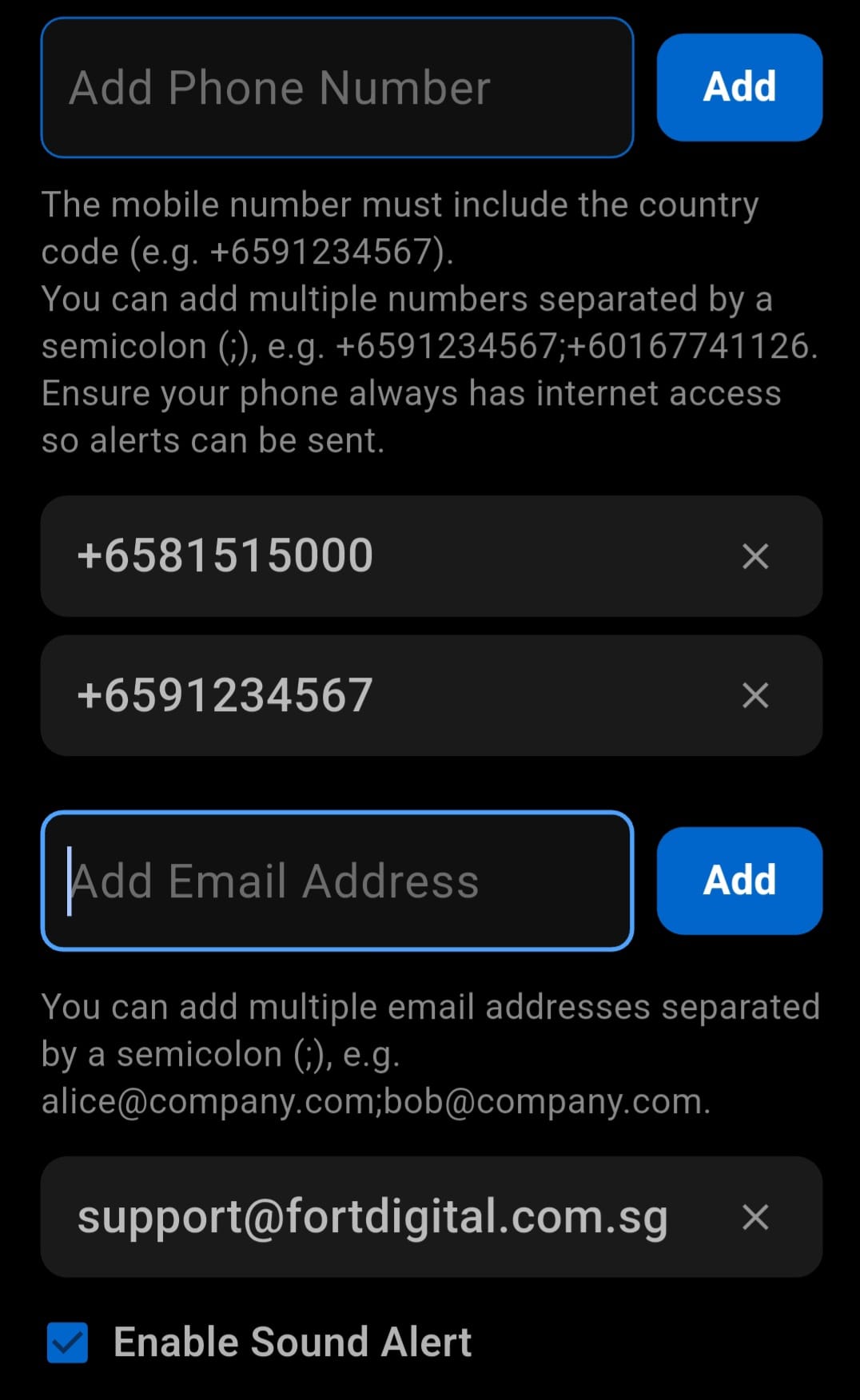
Add Multiple Mobile Numbers and Email
You can add multiple mobile numbers to receive SMS & Voice Call Notifications (Add with Country Code like +6591234567). If you miss the alert, others will still be informed.
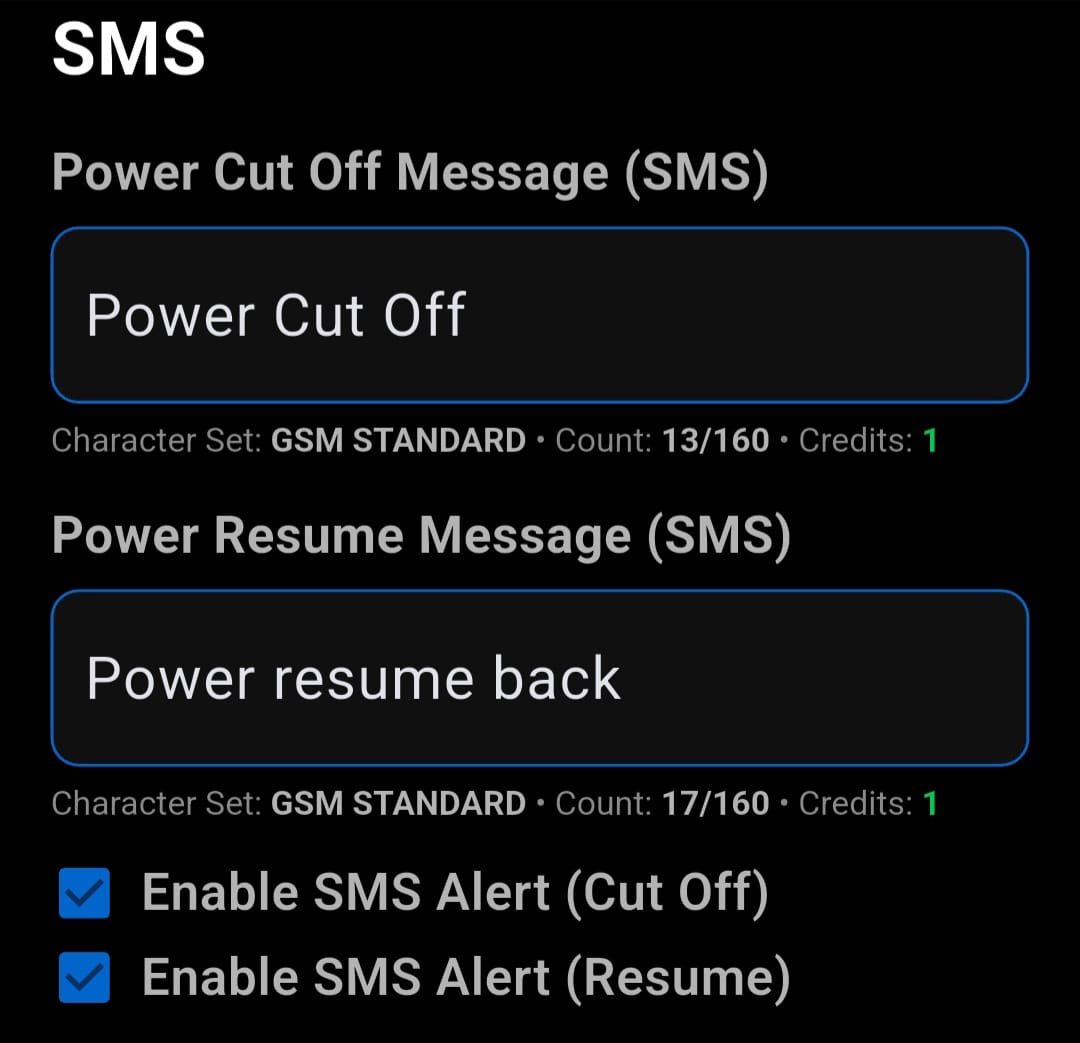
Change SMS Messages and Settings
You can customise SMS Content for both Power Cutoff and Power Resume notifications
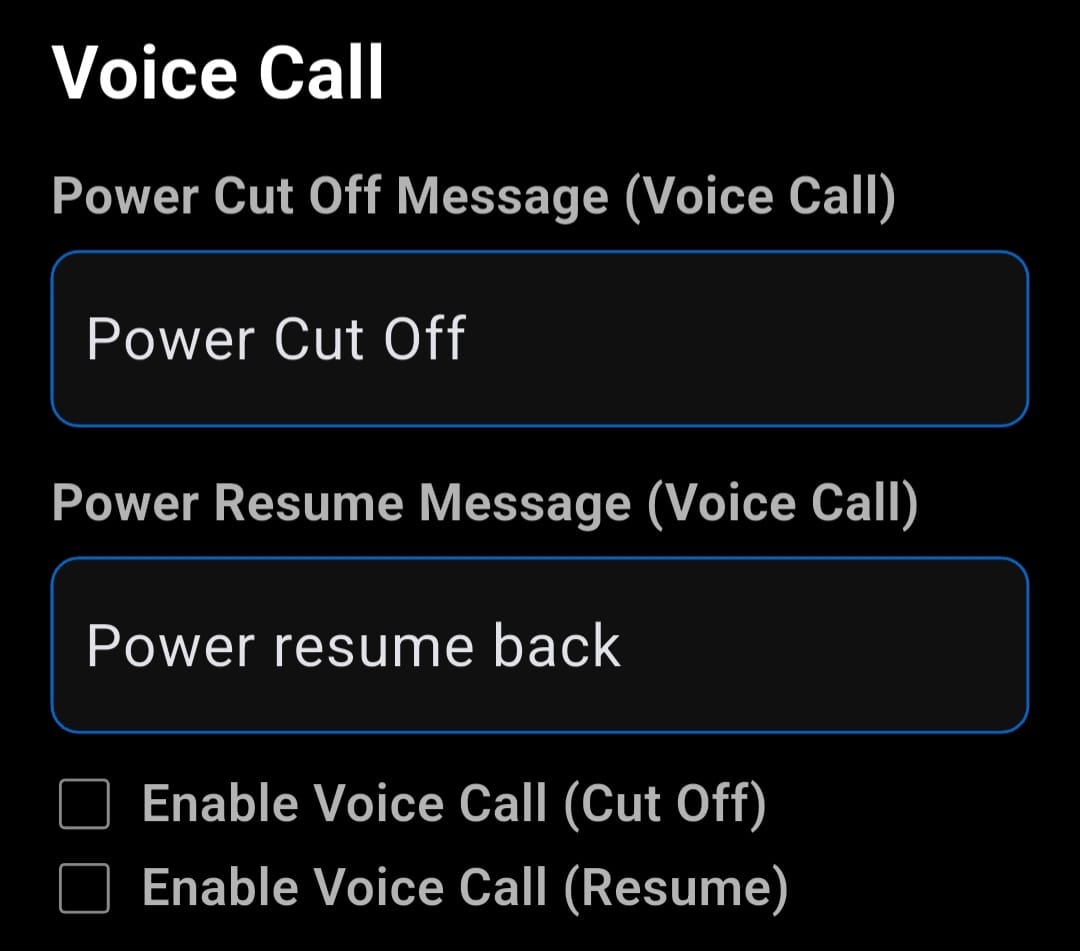
Change Voice Call Messages and Settings
You can customise Voice Call Content for both Power Cutoff and Power Resume notifications
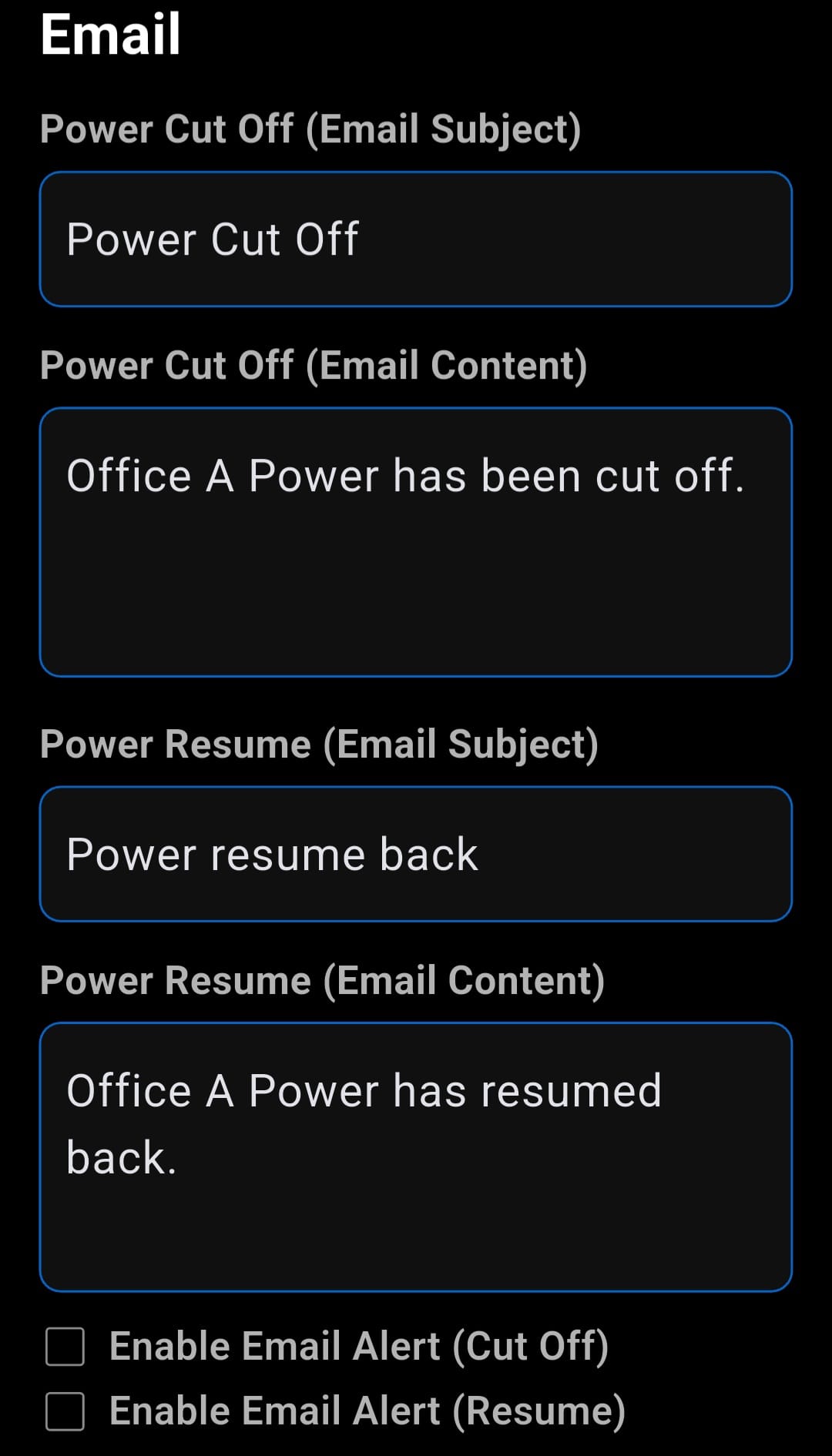
Change Email Messages and Settings
You can customise Email Content for both Power Cutoff and Power Resume notifications
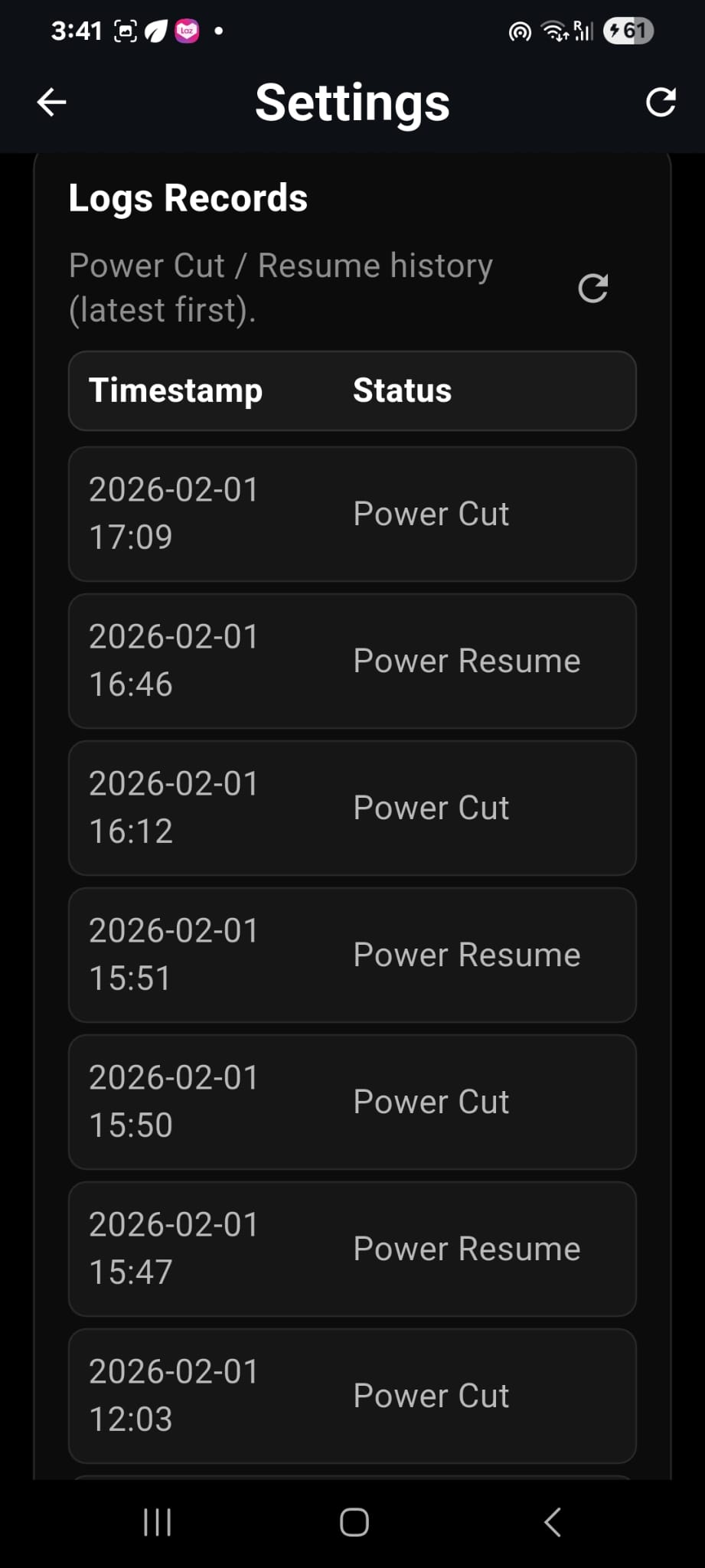
Activity Logs
Every power outage and restoration event will be automatically recorded in the logs for future review and inspection.
No Distruption on Phone Standby
This service continues to operate even when your phone is in standby mode or the screen is turned off. It continuously monitors the power source in the background at all times.
Sound Alert During Power Outage
You can also enable the Sound Alert function and choose a custom alarm sound from your phone’s system. Once a power outage occurs, the phone will continuously beep and blare until you either tap the screen or restore the power. This ensures that people nearby are also alerted to the situation immediately.
Installation Instructions & Pricing
1. Install the app from the Google Play Store
2. Open the app and tap the Settings icon at the bottom of the screen.
3. Sign in using your Google account by tapping the “Sign in with Google” button. You must log in before you can subscribe to the service.
4. Scroll down to the Subscriptions section and choose one of the following plans:
* Basic: USD 5 for 1 month with 20 credits per month
* Standard: USD 25 for 6 months with 20 credits per month
* Premium: USD 45 for 12 months with 20 credits per month
After completing payment, scroll back to the top to view the Account Summary. This section will show your subscription expiry date, monthly credits, and any additional credits.
5. Configure your notification messages for SMS, Call, and Email. You can customize the message content and Enable or Disable each notification channel for Power Cut Off and Power Resume events. Each notification sent will consume 1 credit.
6. Enter your mobile number for SMS and Call notifications. If you wish to receive email alerts, enter your email address as well.That’s all. To test the system, plug in the power charger and ensure Power Resume notifications are enabled. You should receive SMS/Call/Email alerts based on your settings.
7. Next, unplug the power charger to simulate a power outage and verify that the corresponding alerts are received.Please note that the app must remain running at all times to function properly, and your device must have an active internet connection.
All alerts are sent via internet-based SMS/Call/Email services, not through your device’s SIM card.
Also note that SMS and Call delivery may be restricted in certain countries due to local telecom regulations and may be blocked. We recommend subscribing to the 1-month plan with 20 credits first to test SMS and Call delivery in your country.
If your credits are used up before the next monthly renewal, you can top up Additional Credits at any time, and these extra credits do not expire.
There is also LOGS to shows all the Power Trip and Power Resume Records for your reference.If you have any questions, please contact us via WhatsApp
License and Terms & Conditions of Use
One activation license is valid for only one phone.If you need multiple phones for different locations, you must purchase separate licenses. License transfer is possible, but you must deactivate the old license first.

License Transfer Process:
1. Contact us at https://wa.me/6581515000 or support@fortdigital.com.sg
2. Provide your old phone's DEVICE ID and the new phone's DEVICE ID for deactivation and transfer.

App Updates & Maintenance
- The app automatically checks for updates every time you open it.
- You will receive 5 years of free upgrades, ensuring access to the latest features and improvements.

Disclaimer & Responsibility
- We are not liablefor any issues, damages, or losses caused by using this app.
- We are not responsibleif the app does not function as intended.
- Your phone and SIM card are your responsibility. Ensure they are in good condition and working properly.

Safety Precautions
- Regularly checkyour phone, charging cables, and battery health.
- Avoid using a bloated battery, as it may cause explosions or fires.
- It’s recommended to replace your phone’s battery periodically for safety.

SIM Card & Service Plan
- Make sure your SIM card has enough SMS and CALL credits to send notifications.
- Receiving multiple SMS or Calls is normal due to phone settings and configurations.
Custom Functions
We understand that no system is perfect, and you may have specific requirements or need additional features tailored to your needs. Simply reach out to us for a discussion, and we can customize new functions or enhancements for you at an affordable cost.